5. Large Language Models Integration into MTUOC-server
Learning Objectives
After completing this section, you should be able to:
-
Deploy and configure open LLMs locally for translation with MTUOC-server.
-
Configure prompts and generation parameters as components of an LLM-based translation system.
-
Deploy and test a translation-specific LLM with SalamandraTA and a general-purpose LLM with Gemma.
-
Compare direct local model loading through Hugging Face Transformers with model deployment through Ollama and make both types of models available to external applications through MTUOC-server.
Suggested Reading
To gain a deeper understanding of the two LLM families used in this section, we recommend the following technical and academic papers:
- Garcia Gilabert, J., Liao, X., Da Dalt, S., Bohman, E., Mash, A., De Luca Fornaciari, F., Baucells, I., Llop, J., Claramunt, M., Escolano, C., & Melero, M. (2025). From SALAMANDRA to SALAMANDRATA: BSC Submission for WMT25 General Machine Translation Shared Task. In Proceedings of the Tenth Conference on Machine Translation, pages 614–637.
- Gemma Team (2026). Gemma 4 Technical Report. arXiv:2607.02770.
5.0. From LLMs to MTUOC-server
In Section 4, we explored how Large Language Models can be used for translation and translation-related tasks. We also saw that, unlike conventional NMT systems, LLM-based translation normally requires a prompt that tells the model what to do and may provide additional information such as context, terminology, examples, or output constraints.
We will now put these principles into practice by integrating LLMs into MTUOC-server.
The overall architecture remains the same as in the previous sections:
translation model → MTUOC-server → CAT tool → translator
However, when the translation model is an LLM, additional elements become part of the translation system:
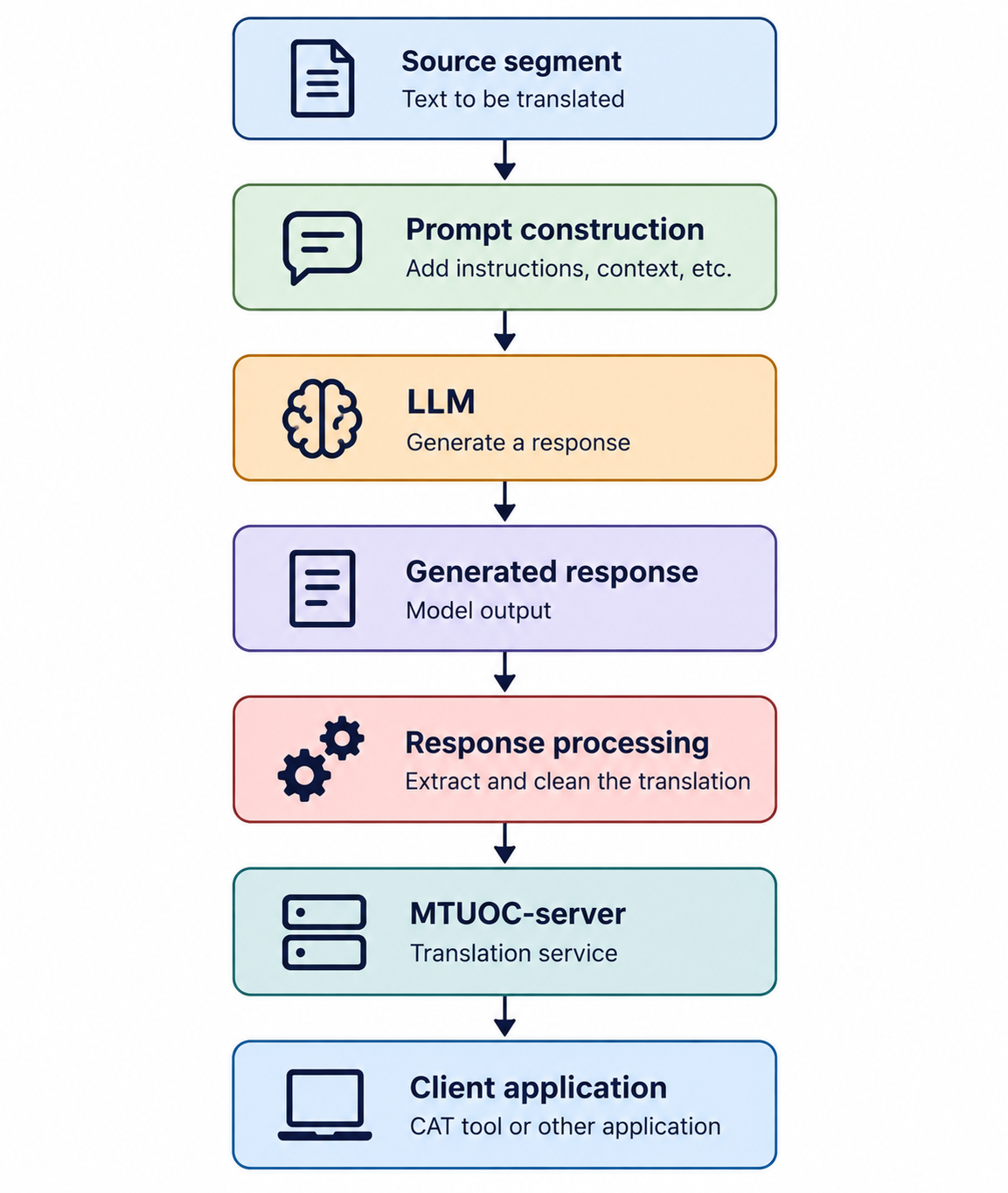
In this section, we will work with two different models:
- SalamandraTA, a model specifically adapted for translation and translation-related tasks;
- Gemma, a general-purpose LLM that can be instructed to perform translation.
They also illustrate two different deployment architectures. SalamandraTA will be loaded and run locally through the Hugging Face engine, while Gemma will be managed through Ollama.
As in Section 2, we will follow a simple deployment principle:
- understand the model and its requirements;
- test it independently;
- configure it for MTUOC-server;
- start the server;
- test the complete translation workflow.
5.1. SalamandraTA
SalamandraTA is a family of models developed by the Barcelona Supercomputing Center (BSC) and specifically trained for translation and translation-related tasks.
Unlike a general-purpose instruction model, SalamandraTA has been specifically trained for translation and translation-related tasks. In addition to direct translation, the model can be used for tasks such as automatic post-editing, paragraph-level translation, named entity recognition, and grammar correction.
SalamandraTA is available in different sizes, including:
salamandraTA-2b-instruct
salamandraTA-7b-instruct
In this exercise, we will use the smaller 2B instruct model, which has lower computational requirements and is therefore more suitable for local deployment.
5.1.1. Testing SalamandraTA with Python
Before integrating SalamandraTA into MTUOC-server, we will test the model independently.
SalamandraTA can be loaded directly using the Hugging Face Transformers library.
Make sure that the following Python packages are installed:
pip install torch transformers accelerate
The following script loads SalamandraTA and translates a sentence from English into Spanish:
import torch
from transformers import AutoTokenizer, AutoModelForCausalLM

def translate_salamandra_manual(text, model_id, source_lang, target_lang):
    tokenizer = AutoTokenizer.from_pretrained(model_id)

    if tokenizer.pad_token is None:
        tokenizer.pad_token = tokenizer.eos_token

    model = AutoModelForCausalLM.from_pretrained(
        model_id,
        device_map="auto",
        dtype=torch.bfloat16
    )

    # 1. Construct the prompt following the model format
    system_prompt = "You are a professional translator."

    user_prompt = (
        f"Translate the following text from {source_lang} into {target_lang}.\n"
        f"{source_lang}: {text}\n"
        f"{target_lang}:"
    )

    full_prompt = (
        f"<|im_start|>system\n{system_prompt}<|im_end|>\n"
        f"<|im_start|>user\n{user_prompt}<|im_end|>\n"
        f"<|im_start|>assistant\n"
    )

    # 2. Tokenization
    inputs = tokenizer(
        full_prompt,
        return_tensors="pt",
        add_special_tokens=False
    ).to(model.device)

    input_length = inputs.input_ids.shape[1]

    # 3. Generation
    outputs = model.generate(
        inputs.input_ids,
        attention_mask=inputs.attention_mask,
        max_new_tokens=400,
        num_beams=5,
        early_stopping=True,
        pad_token_id=tokenizer.pad_token_id,
        eos_token_id=tokenizer.convert_tokens_to_ids("<|im_end|>")
    )

    # 4. Decoding
    result = tokenizer.decode(
        outputs[0][input_length:],
        skip_special_tokens=True
    )

    return result.replace("<|im_end|>", "").strip()


if __name__ == "__main__":

    # If you want to load the model directly from Hugging Face:
    # model_id = "BSC-LT/salamandraTA-2b-instruct"

    # If the model has already been downloaded locally:
    model_id = "../../models/salamandraTA-2b-instruct"

    src = "English"
    tgt = "Spanish"

    sentence = (
        "Artificial intelligence (AI) is the capability of computational "
        "systems to perform tasks typically associated with human intelligence, "
        "such as learning, reasoning, problem-solving, perception, and "
        "decision-making."
    )

    translation = translate_salamandra_manual(
        sentence,
        model_id,
        src,
        tgt
    )

    print(f"\nTranslation: {translation}")
The output should be similar to:
Translation: La inteligencia artificial (IA) es la capacidad de los sistemas computacionales para realizar tareas típicamente asociadas con la inteligencia humana,
tales como el aprendizaje, el razonamiento, la resolución de problemas, la percepción y la toma de decisiones.
There are several important elements in this script.
First, the model is loaded using:
AutoModelForCausalLM.from_pretrained()
Unlike the dedicated NMT models used earlier in the course, SalamandraTA is therefore loaded as a causal language model.
Second, translation is specified through a prompt:
Translate the following text from English into Spanish.
English: [source text]
Spanish:
The script constructs the complete interaction using special delimiters:
<|im_start|>system
You are a professional translator.<|im_end|>
<|im_start|>user
...
<|im_end|>
<|im_start|>assistant
These delimiters identify the different parts of the interaction.
Finally, after generation, the script decodes only the tokens generated after the input prompt:
outputs[0][input_length:]
This prevents the original prompt from being included in the returned translation.
5.1.2. Installing SalamandraTA with MTUOC-server-manager
Once we have verified that the model works independently, we can deploy it through MTUOC-server.
The easiest method is to use MTUOC-server-manager and download the following recipe:
recipe-SalamandraTA.yaml
The recipe downloads the 2B model together with the configuration files required for an English-to-Spanish translation server.
The resulting structure includes the server configuration:
config-server-SalamandraTA.yaml
and, inside the model directory:
salamandraTA-2b-instruct/
└── config-model-SalamandraTA.yaml
The default configuration is prepared for English → Spanish, but both the translation direction and other settings can be adapted.
5.1.3. Server Configuration
Open:
config-server-SalamandraTA.yaml
The file contains:
MTengine: HuggingFace
#download, Marian, Eole, OpusMT, NLLB, HuggingFace, Ollama, GoogleT, DeepL
system_name: SalamandraTA
model_config: ./salamandraTA-2b-instruct/config-model-SalamandraTA.yaml

MTUOCServer:
  port: 8000
  type: MTUOC
  #one of MTUOC, Moses, ModernMT, OpenNMT, NMTWizard
  verbosity_level: 1
  log_file: log.log
  timeout: 45

dopreprocess: False
preprocess_config: None
dotokenization: False
tokenization_config: None
dopostprocess: False
postprocess_config: None

TranslationMemory:
  use: False
  memo: None
  minsim: 100
The most important setting for this exercise is:
MTengine: HuggingFace
This tells MTUOC-server that the model will be loaded using the Hugging Face engine.
The corresponding model configuration is specified here:
model_config: ./salamandraTA-2b-instruct/config-model-SalamandraTA.yaml
Notice that the model configuration is located inside the SalamandraTA model directory.
5.1.4. Model and Prompt Configuration
Now open:
salamandraTA-2b-instruct/config-model-SalamandraTA.yaml
The default configuration is:
prompt_settings:
  template: "Translate the following text from English into Spanish.\nEnglish: {SLsegment}\nSpanish:"
  json_key: None
  regex_pattern: None

model_settings:
  name: "./salamandraTA-2b-instruct"
  device: "cpu"
  #cpu or cuda
  trust_remote_code: true

generation_params:
  max_new_tokens: 512
  temperature: 0.0
  repetition_penalty: 1.2
  top_k: 40
  top_p: 0.9
  no_repeat_ngram_size: 3
  num_beams: 1
  use_eos_token: true
  stop_sequences: ["<|im_end|>", "\nEnglish:", "###"]
The file contains three main groups of parameters:
- prompt settings;
- model settings;
- generation parameters.
Prompt Settings
The translation prompt is defined here:
template: "Translate the following text from English into Spanish.\nEnglish: {SLsegment}\nSpanish:"
{SLsegment} is automatically replaced with the source segment received by MTUOC-server.
For example, if the server receives:
This is a translation test.
the prompt becomes:
Translate the following text from English into Spanish.
English: This is a translation test.
Spanish:
The translation direction can therefore be changed by adapting the prompt.
For example, for Spanish-to-English translation:
template: "Translate the following text from Spanish into English.\nSpanish: {SLsegment}\nEnglish:"
The other two prompt settings are:
json_key: None
regex_pattern: None
They can be used when the model returns structured or additional content that needs to be processed. They are not required for the present configuration.
Model Settings
The model itself is specified here:
name: "./salamandraTA-2b-instruct"
The device used for inference is configured with:
device: "cpu"
If a compatible GPU is available and the environment has been configured appropriately, this can be changed to:
device: "cuda"
Running the model on a GPU can substantially accelerate inference.
Generation Parameters
The final section controls text generation:
generation_params:
  max_new_tokens: 512
  temperature: 0.0
  repetition_penalty: 1.2
  top_k: 40
  top_p: 0.9
  no_repeat_ngram_size: 3
  num_beams: 1
  use_eos_token: true
  stop_sequences: ["<|im_end|>", "\nEnglish:", "###"]
As discussed in Section 4, these parameters influence the model's generation behaviour.
For example:
temperature: 0.0
reduces randomness, while:
max_new_tokens: 512
limits the maximum length of the generated response.
The stop_sequences setting specifies sequences that indicate that generation should stop:
stop_sequences: ["<|im_end|>", "\nEnglish:", "###"]
For this practical exercise, the default values can be retained.
5.1.5. Starting and Testing SalamandraTA
Once the model and configuration files are ready, start MTUOC-server using:
config-server-SalamandraTA.yaml
During startup, MTUOC-server will load the SalamandraTA model specified in the configuration.
Once the server is running, send it an English test segment such as:
Artificial intelligence is changing the translation industry.
The server should return a Spanish translation.
At this point, the complete workflow is:
source segment
      ↓
MTUOC-server
      ↓
translation prompt
      ↓
SalamandraTA
      ↓
generated translation
      ↓
MTUOC-server
      ↓
client application
From the perspective of a CAT tool or another client application, SalamandraTA now behaves as a translation engine accessible through MTUOC-server.
5.1.6. Adapting the Configuration
The recipe provides a working English-to-Spanish configuration, but it can be adapted to different requirements.
The most relevant elements to modify are:
Translation direction
Change the language names in the prompt:
template: "Translate the following text from Spanish into English.\nSpanish: {SLsegment}\nEnglish:"
Device
Use:
device: "cpu"
or, where appropriate:
device: "cuda"
Prompt
Additional instructions can be incorporated using the prompting techniques introduced in Section 4.
For example:
template: "Translate the following text from English into Spanish. Use formal Spanish and provide only the translation.\nEnglish: {SLsegment}\nSpanish:"
This illustrates an important characteristic of LLM-based deployment: the prompt itself becomes part of the translation engine configuration.
5.1.7. Practical Activity
Deploy SalamandraTA through MTUOC-server and perform the following steps:
- Download
recipe-SalamandraTA.yamlusing MTUOC-server-manager. - Locate
config-server-SalamandraTA.yamlandconfig-model-SalamandraTA.yaml. - Check that the model is configured to use the appropriate device (
cpuorcuda). - Start MTUOC-server.
- Translate several English sentences into Spanish.
- Modify the prompt to add one additional translation instruction.
- Restart the server if necessary and translate the same sentences again.
- Compare the translations produced with the two prompts.
After completing the activity, you should be able to identify the three main elements involved in this deployment:
MTUOC-server configuration
        +
SalamandraTA model
        +
translation prompt
Together, these components turn the locally deployed LLM into a translation service that can be accessed by external applications.
5.2. Gemma
We will now use Gemma, a family of open-weight models developed by Google.
Gemma models are based on research and technology related to Google's Gemini models, but their weights can be downloaded and the models can be run locally. This makes them particularly interesting for experimenting with local LLM deployment and integration into translation workflows.
The Gemma family includes models of different sizes and variants designed for different tasks. In this practical exercise, we will use:
gemma4:e4b
Rather than treating the model as a conventional MT engine, we will explicitly instruct it to translate through a translation prompt. This provides a practical example of the prompting principles introduced in Section 4.
5.2.1. Testing Gemma with Python and Ollama
Before integrating the model into MTUOC-server, we will test it independently. In this example, Gemma will be accessed through Ollama.
Make sure that Ollama is installed and running on your computer. You will also need the Ollama Python library:
pip install ollama
The following Python script sends a translation prompt to the model:
import ollama

# --- OLLAMA SERVER & MODEL SETTINGS ---
MODEL = "gemma4:e4b"
HOST = "http://localhost:11434"

# --- LLM GENERATION PARAMETERS (Ollama Options) ---
generation_params = {
    "temperature": 0.0,
    "num_predict": 128,
    "num_ctx": 2048,
    "repeat_penalty": 1.2,
    "top_k": 40,
    "top_p": 0.9,
    "seed": 42,
    "stop": ["\n", "###"]
}

def executePrompt(prompt):
    try:
        client = ollama.Client(host=HOST)

        response = client.generate(
            model=MODEL,
            prompt=prompt,
            options=generation_params
        )

        output_text = response["response"]

        print("--- Gemma 4 answer ---")
        print(output_text)

    except Exception as e:
        print(f"Error in connection or generation: {e}")

if __name__ == "__main__":

    source_text = "This is an example of translation using a large language model."

    prompt = f"""Translate the following text from English into Spanish.
Provide only the translation.
English: {source_text}"""

    executePrompt(prompt)
If the model and Ollama are working correctly, the output should be similar to:
--- Gemma 4 answer ---
Este es un ejemplo de traducción utilizando un modelo de lenguaje grande.
Notice that the source sentence is incorporated into a prompt:
Translate the following text from English into Spanish.
Provide only the translation.
English: This is an example of translation using a large language model.
The instruction:
Provide only the translation.
is particularly important for integration into an automated workflow. MTUOC-server needs to return the translated segment rather than explanations or additional text generated by the LLM.
The script also defines a set of generation parameters. These control aspects of the model's output, such as maximum generation length, context size, repetition, and token selection.
For translation, the configuration uses:
temperature: 0.0
This reduces randomness in generation and makes the output more deterministic, which is generally desirable when using an LLM as part of a translation workflow.
5.2.2. Installing Gemma with MTUOC-server-manager
Once we have verified that the model works independently, we can integrate it into MTUOC-server.
Use MTUOC-server-manager and download the following recipe:
recipe-ollama-Gemma4.yaml
The recipe creates the configuration files required to connect MTUOC-server to the model running through Ollama.
Two configuration files are particularly important:
config-server-ollama-Gemma4.yaml
config-model-ollama-Gemma4.yaml
They perform different functions:
config-server-ollama-Gemma4.yaml configures MTUOC-server itself and specifies which model configuration should be used.
config-model-ollama-Gemma4.yaml defines how MTUOC-server communicates with Ollama and how the LLM should generate the translation.
5.2.3. Server Configuration
Open:
config-server-ollama-Gemma4.yaml
The configuration is:
MTengine: Ollama
#download, Marian, Eole, OpusMT, NLLB, HuggingFace, Ollama, GoogleT, DeepL
system_name: Ollama
model_config: config-model-ollama-Gemma4.yaml

TranslationMemory:
#path to memory or None
  Path: None
  sl: es
  tl: en

MTUOCServer:
  port: 8000
  type: MTUOC
  #one of MTUOC, Moses, ModernMT, OpenNMT, NMTWizard
  verbosity_level: 1
  log_file: log.log
  timeout: 45

dopreprocess: False
preprocess_config: None
dotokenization: False
tokenization_config: None
dopostprocess: False
postprocess_config: None
The most important line for this exercise is:
MTengine: Ollama
This tells MTUOC-server that translation requests will be handled through Ollama.
The following line identifies the separate model configuration:
model_config: config-model-ollama-Gemma4.yaml
The server configuration determines how MTUOC-server operates, while the model configuration determines which LLM is used and how prompts are sent to it.
5.2.4. Model and Prompt Configuration
Now open:
config-model-ollama-Gemma4.yaml
The complete configuration is:
# --- OLLAMA SERVER & MODEL SETTINGS ---
ollama_settings:
  model: "gemma4:e4b"
  host: "http://localhost:11434"
  timeout: 5

# --- LLM GENERATION PARAMETERS (Ollama Options) ---
generation_params:
  temperature: 0.0
  num_predict: 128
  num_ctx: 2048
  repeat_penalty: 1.2
  top_k: 40
  top_p: 0.9
  seed: 42
  stop: ["\n", "###"]

# --- LLM PROMPT AND RESPONSE PARSING ---
prompt_settings:
  prompt_template: |
    Translate the following text from English into Spanish. Provide only the translation.
    English: {SLsegment}

  json_key: "None"
  regex_pattern: None
The file contains three main groups of settings:
- Ollama and model settings;
- generation parameters;
- prompt and response processing.
Ollama Settings
The model is specified here:
model: "gemma4:e4b"
and the location of the Ollama service here:
host: "http://localhost:11434"
In this example, Ollama is running locally on the same computer as MTUOC-server.
Generation Parameters
The second part contains the generation parameters used by the model.
For example:
temperature: 0.0
makes generation more deterministic, while:
num_predict: 128
limits the maximum number of tokens generated.
At this stage, you do not need to modify these parameters. The important point is to understand that LLM generation behaviour forms part of the translation engine configuration.
Prompt Settings
The translation prompt is defined as:
prompt_template: |
  Translate the following text from English into Spanish. Provide only the translation.
  English: {SLsegment}
{SLsegment} is replaced automatically with the source segment received by MTUOC-server.
For example, if the server receives:
This is an example.
the prompt sent to Gemma becomes:
Translate the following text from English into Spanish. Provide only the translation.
English: This is an example.
This illustrates one of the main differences between the NMT systems used earlier in the course and LLM-based translation:
NMT:
source segment → model

LLM:
source segment → prompt construction → model
The configuration also contains:
json_key: "None"
regex_pattern: None
These options can be used when the model's response needs additional processing.
In this case, no JSON key or regular expression is required because the prompt asks Gemma to return only the translation.
5.2.5. Where Is the Model?
There is an important difference between this configuration and the SalamandraTA configuration.
When using Ollama, there is no model folder inside the MTUOC-server directory.
The model is managed by Ollama and stored in an Ollama-specific directory. The exact location may depend on the operating system and installation method.
MTUOC-server therefore does not load the Gemma model directly from its own directory. Instead, it sends the prompt to the local Ollama service, which manages the model and returns the generated response.
The architecture can be represented as:
CAT tool
   ↓
MTUOC-server
   ↓
Ollama
   ↓
Gemma
   ↓
Ollama
   ↓
MTUOC-server
   ↓
CAT tool
This distinction is useful when troubleshooting the system: MTUOC-server, Ollama, and the LLM are separate components, even though together they behave as a single translation service from the perspective of the CAT tool.
5.2.6. Testing Gemma through MTUOC-server
Once the configuration files are ready and Ollama is running, start MTUOC-server using the Gemma configuration.
Send a test segment to the server and verify that the response contains only the Spanish translation.
For example:
This is an example of translation using a large language model.
should produce a response similar to:
Este es un ejemplo de traducción utilizando un modelo de lenguaje grande.
At this point, the complete workflow is operational:
source segment
      ↓
MTUOC-server
      ↓
translation prompt
      ↓
Ollama
      ↓
Gemma
      ↓
generated translation
      ↓
MTUOC-server
      ↓
client application
You have therefore converted a locally running LLM into a translation service that can be accessed through the same MTUOC-server interface used elsewhere in this course.
5.2.7. Practical Activity
Using the Gemma configuration created in this subsection:
- Start Ollama and make sure that
gemma4:e4bis available. - Start MTUOC-server with the Gemma configuration.
- Translate several English sentences into Spanish.
- Check whether Gemma returns only the translation.
- Modify the translation prompt by adding one instruction introduced in Section 4, for example:
- a terminology requirement;
- information about the domain;
- a register requirement.
- Restart the server if necessary and translate the same sentences again.
- Compare the two outputs.
The objective is not simply to obtain a translation, but to observe how the prompt becomes part of the configuration of an LLM-based translation system.
5.3. Comparing the Two Approaches
SalamandraTA and Gemma illustrate two different ways of integrating an open LLM into MTUOC-server.
With SalamandraTA, MTUOC-server uses the Hugging Face engine to load and run the locally stored model directly:
MTUOC-server → Hugging Face engine → SalamandraTA
With Gemma, model execution is managed by Ollama. MTUOC-server communicates with the local Ollama service, which in turn runs the model:
MTUOC-server → Ollama → Gemma
The two configurations can be compared as follows:
| SalamandraTA | Gemma | |
|---|---|---|
| Model | salamandraTA-2b-instruct |
gemma4:e4b |
| Model type | Translation-specific LLM | General-purpose LLM |
| MTUOC engine | Hugging Face | Ollama |
| Model execution | Loaded locally through Hugging Face Transformers | Managed by Ollama |
| Model location | Local model directory | Ollama model storage |
| Translation task | Translation-oriented model + prompt | Defined through the prompt |
| Prompt configuration | MTUOC model configuration | MTUOC model configuration |
| Generation parameters | Configured in YAML | Configured in YAML |
| Local execution | Yes | Yes |
Despite these differences, MTUOC-server provides the same external interface to client applications. A CAT tool does not need to know whether the underlying translation is being generated by a model loaded directly through the Hugging Face engine or by a model managed through Ollama.
This illustrates one of the main purposes of MTUOC-server: different translation technologies can be exposed through a common interface and incorporated into the same translation workflow.
It also shows why LLM deployment involves more than simply selecting a model. The complete translation system includes the model, execution framework, prompt, generation parameters, response processing, and server configuration.
Key Takeaways
After completing this section, you should remember that:
-
Open LLMs can be integrated into MTUOC-server and made available to external applications through the same translation interface used for other MT systems.
-
SalamandraTA and Gemma illustrate two different deployment approaches: direct local model loading through the Hugging Face engine and model management through Ollama.
-
In LLM-based translation, the prompt and generation parameters become part of the translation system configuration and determine how source segments are processed and responses are generated.
-
The underlying model and deployment framework remain separate from the client application, allowing different LLM-based translation systems to be integrated into the same MTUOC-server workflow.